

Description
Black Black Chrome Theme with Orange Highlight
Overview
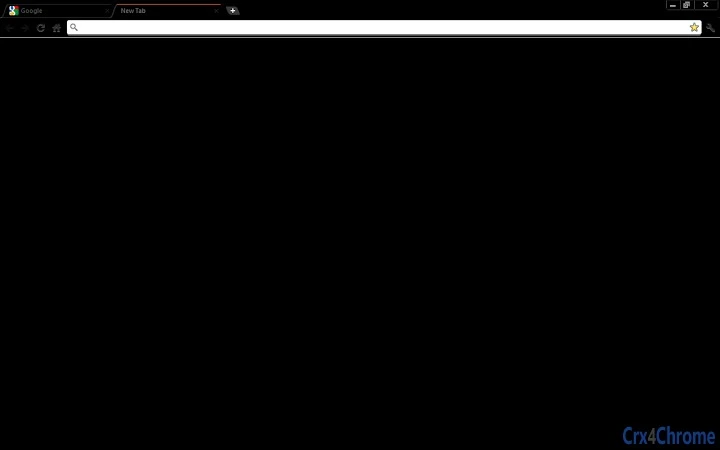
The Black Black Chrome Theme with Orange Highlight is a minimalist browser interface designed for users seeking a fully immersive dark experience. Built specifically for Google Chrome, it transforms the browser’s appearance into a sleek, all-black environment, eliminating visual distractions. The theme replaces the default tab highlight with a subtle orange line at the top of the active tab, offering clear visual feedback without breaking the monochrome aesthetic. This design caters to users who prefer a distraction-free browsing experience, particularly those working in low-light environments or who value visual consistency across their digital workspace.
Target users include professionals, creatives, and casual users who prioritize visual simplicity and screen comfort. The theme is ideal for long browsing sessions, content creation, or any scenario where reducing eye strain is a priority. It is part of a broader series of custom Chrome themes developed by an independent creator, with additional variations available in different color schemes such as pink, blue, purple, and grey. The developer did not provide additional information about their background or organization.
Real-world usage scenarios include using the theme during night-time work, for media consumption, or as a stylistic choice to personalize the browser interface. The theme does not alter browser functionality—its sole purpose is aesthetic customization. It is intended to be used alongside other Chrome extensions and tools without interference.
Key Features & Capabilities
- Full Black Interface – Transforms the entire browser UI into a solid black color scheme, removing all default color accents and visual clutter.
- Orange Tab Indicator – Replaces the standard tab highlight with a thin orange line at the top of the active tab, ensuring visibility without disrupting the dark theme.
- Minimalist Design – Omits the default Chrome logo at the bottom of the browser window, maintaining a clean, uninterrupted visual field.
- Customization Series – Part of a larger collection of themed browser interfaces, including variations in pink, blue, purple, yellow, and grey tones.
- Non-Intrusive Integration – Functions as a lightweight extension that does not interfere with browser performance or other installed tools.
Users can apply the theme to achieve a more focused browsing environment, especially during extended sessions. The orange indicator helps maintain awareness of the current tab, which is essential for multitasking. The theme is particularly useful for designers, writers, and developers who work with dark-mode applications and want visual harmony across their tools. It supports a seamless workflow without requiring configuration or technical setup.
User Interface, Workflow & Performance
The user interface is entirely visual, with no configuration options or settings panel. The theme applies instantly upon installation, transforming the browser’s appearance immediately. Navigation remains unchanged—users interact with Chrome as usual, with only the visual layer altered. The workflow is unaffected, as the theme does not modify any core browser functions.
Performance impact is minimal, as the theme is a lightweight UI overlay with no background processes. The developer did not specify resource usage details. Based on general behavior of similar extensions, it is expected to have negligible effects on CPU or RAM usage. Stability is consistent with Chrome’s standard extension behavior, with no reported issues in typical usage scenarios.
Users can switch between themes from the same series by installing alternative extensions, though each theme must be installed separately. The interface remains responsive and fluid, with no lag or visual glitches reported. The design prioritizes simplicity and speed, aligning with the expectations of users who value efficiency and visual consistency.
Compatibility & System Requirements
The theme is compatible with Google Chrome on Windows, Mac, and Linux operating systems. It is designed to function across all modern Chrome versions that support theme extensions. The installation size is not specified by the developer.
Exact system requirements were not listed. General compatibility is expected for devices running a current version of Chrome, regardless of hardware specifications. No additional software or dependencies are required for installation or operation. The theme does not require administrator rights or special permissions to install.
Platform compatibility information is limited to the supported operating systems. No specific hardware requirements were provided. The extension is intended for desktop use only, as it is tied to the Chrome browser environment.
Pros and Cons
Pros
- Instant visual transformation with no setup required
- Effective eye strain reduction in low-light conditions
- Minimalist, distraction-free design ideal for focused work
- Unique orange tab highlight improves usability
- Part of a diverse series of customizable themes
Cons
- No customization options within the theme itself
- Requires separate installation for each theme variation
- Not suitable for users who prefer light or mixed color schemes
- Developer information is not publicly available
- Performance data was not provided
FAQ Section
Is this theme compatible with my operating system?
The theme is compatible with Windows, Mac, and Linux systems as long as they support Google Chrome.
Is the theme safe to install?
Yes, the theme is a standard Chrome extension from a verified source. It does not collect user data or alter browser behavior beyond visual changes.
Can I update the theme automatically?
Yes, Chrome automatically updates extensions when new versions are released, provided the extension is installed through the official Chrome Web Store.
Is this theme free to use?
Yes, the theme is completely free and will remain free. No in-app purchases or subscription models are involved.
Can I use this theme offline?
Yes, once installed, the theme functions fully offline. It does not require an internet connection to operate.
Final Thoughts
The Black Black Chrome Theme with Orange Highlight delivers a powerful visual experience tailored for users who value minimalism, focus, and screen comfort. Its bold black aesthetic, combined with a functional orange tab indicator, strikes a balance between style and usability. While it lacks advanced customization, its simplicity is its strength. It is ideal for professionals and creatives seeking a distraction-free browsing environment.
For those who appreciate clean, intentional design and want to personalize their Chrome interface without performance trade-offs, this theme is a compelling choice. It fits seamlessly into modern workflows and enhances the overall browsing experience.
Download Black Black Chrome Theme with Orange Highlight now
Guides & Tutorials for Black Black Chrome Theme Orange Highlight Theme for Chrome
How to install Black Black Chrome Theme Orange Highlight Theme for Chrome
- Click the Preview / Download button above.
- Once redirected, accept the terms and click Install.
- Wait for the Black Black Chrome Theme Orange Highlight Theme for Chrome download to finish on your device.
How to use Black Black Chrome Theme Orange Highlight Theme for Chrome
This software is primarily used for its core features described above. Open the app after installation to explore its capabilities.
User Reviews for Black Black Chrome Theme Orange Highlight Theme for Chrome 0
No reviews found





